A visa-status monitor that runs at $0/month
How I built ceacmonitor.com — a multi-user tool that watches the U.S. CEAC visa page for you — and what the interesting decisions turned out to be.
I built ceacmonitor.com: a service that watches the U.S. State Department’s CEAC visa-status page on your behalf and pings you — by email or Telegram — the moment your case changes. “Issued.” “Administrative Processing.” “Refused.” It needs no account and no password, handles both nonimmigrant and immigrant cases, is bilingual (English / 中文), and runs almost entirely inside the AWS free tier.
Most of the pieces are well-trodden in isolation — scraping a stateful form, a CAPTCHA model, a fan-out scheduler. What took thought was composing them into something genuinely useful, genuinely cheap, and genuinely polite to the site it depends on. So this is a record of the decisions that mattered, not a tutorial.
One thing up front, since it shapes everything below: I didn’t write a single line of this. Every line of code and every piece of AWS infrastructure was built by Claude Code — my whole job was deciding what to build and judging whether the result was any good. What that changed about the work, and what it taught me about building software with AI, is the note I’ve saved for the end.
Here’s the whole system on one page:
flowchart TB
  Browser["Browser — React SPA (en / 中文)"]
  CF["CloudFront"]
  S3["S3 — static site"]
  API["HTTP API (Lambda)"]
  Sched["Scheduler (Lambda)"]
  Checker["checker engine (shared module)"]
  ONNX["ONNX CAPTCHA solver"]
  CEAC["CEAC site"]
  DB[("DynamoDB — subscriptions / status / history")]
  Cron(["EventBridge cron"])
  TG["Telegram bot"]
  SES["SES email"]

  Browser -->|same-origin| CF
  CF -->|"/api/*"| API
  CF -->|everything else| S3

  Cron -->|fan-out| Sched
  TG -->|"webhook: /check, /status, ..."| API

  Sched -->|imports| Checker
  API -->|imports| Checker
  Checker -->|scrape| CEAC
  Checker -.->|solve CAPTCHA| ONNX

  Sched <--> DB
  API <--> DB

  Sched -->|on change| SES
  Sched -->|on change| TG
  API -->|command replies| TG
  API -->|verification email| SES
It’s all serverless AWS — CloudFront + S3 for the site, Lambda for the logic, DynamoDB for state, EventBridge for the cron, SES for email — so there’s nothing always-on to pay for and the whole thing idles at ~$0. (Details and the why-not-Amplify story are at the end.)
The thing to notice: the checker engine is one shared module, imported by
both the scheduler and the API. One copy of the scraping-and-solving logic, three
ways to fire it — the cron, the dashboard’s Check Now button, and a Telegram
/check. The scheduler runs it as a batched fan-out; the API runs the very same
code for a single live check.
By the numbers
A snapshot from the first three months in production:
- ~48,000 status checks run on users’ behalf.
- ~145,000 CAPTCHAs solved automatically — all by the tiny on-device model, just by retrying it until each one stuck.
- ~180 sign-ups across ~100 distinct cases; 112 status changes caught and pushed.
- All of it inside the AWS free tier, at ~$0/month.
The problem
If you’ve applied for a U.S. visa, you know the ritual: open the CEAC status tracker, pick your consulate, type your case number, passport number, and surname, solve a CAPTCHA, and submit — usually to find that nothing has changed. People do this several times a day for weeks. The jump from “Administrative Processing” to “Issued” can mean booking flights, so the anxiety is real.
The page has no API, no notifications, no accounts. So the product writes itself: check it on a schedule, and tell the user only when it actually changes. The catch is that this hides three nastier problems — the page is a stateful form, every check is gated by a CAPTCHA, and doing it for many users without melting my budget or CEAC’s servers takes care. One section each.
Scraping a stateful ASP.NET WebForms page
CEAC is classic ASP.NET WebForms, so the form carries server state. You can’t
just POST your fields; you first GET the page and harvest the hidden state it
expects back — __VIEWSTATE (an opaque blob encoding the server-side control
tree), assorted postback machinery, and a per-render CAPTCHA token tied to the
exact image you were served. The submit itself is an AJAX partial postback
through an UpdatePanel. So one check is: GET the page → parse out the hidden
fields and the CAPTCHA image → solve the CAPTCHA → POST all of it back together
in one request, same session. The payload is a wall of this:
data = {
    "__EVENTTARGET": "ctl00$ContentPlaceHolder1$btnSubmit",
    "__VIEWSTATE": "",            # ← filled from the GET'd page
    "__VIEWSTATEGENERATOR": "",   # ← filled from the GET'd page
    "ctl00$ContentPlaceHolder1$Visa_Case_Number": case_number,
    "ctl00$ContentPlaceHolder1$Captcha": captcha_text,
    "ctl00$ContentPlaceHolder1$Passport_Number": passport,
    "ctl00$ContentPlaceHolder1$Surname": surname,
    "LBD_VCID_c_status_...": "",  # ← per-render CAPTCHA token
    "__ASYNCPOST": "true",
}
Two details cost real time. The consulate dropdown uses opaque numeric option
values that aren’t stable enough to hardcode, so I scrape the <select> and
match the human-readable label to its value at request time. And there’s a “no
data” trap: when your details don’t match a real case, CEAC writes “Your
search did not return any data” into the same error span it uses for a wrong
CAPTCHA. Check the CAPTCHA error first and you’ll mistake a bad case number for a
CAPTCHA miss and burn all your retries. The fix is ordering — test the terminal
“no data” condition before the retryable CAPTCHA one. That rule (specific,
terminal condition wins first) shows up again and again once you look for it.
The CAPTCHA: a fast local model, retried until it’s right
Every check is gated by a distorted-text CAPTCHA. The obvious approach — call a paid vision API each time — is slow and a per-check cost. What actually works is nearly the opposite: a tiny model that’s individually unreliable but free, retried as many times as it takes.
The primary solver is a small pretrained CNN+CTC model (≈12 MB, shipped inside
the Lambda) running on onnxruntime with no network calls — roughly 10ms per
solve, effectively free. (Credit: the model comes from the open-source
CEACStatusBot project.)
The key insight is that a single solve doesn’t have to be reliable, because retrying is free. Each attempt fetches a fresh page with a fresh CAPTCHA, so I just rerun the local model — ten times, twenty if it has to. Even a solver that’s, say, 60% right per image becomes overwhelmingly reliable across that many independent fresh ones, and at ~10ms a go the retries cost essentially nothing. The answer is also self-verifying — if it’s wrong, CEAC tells me — so I never act on a misread.
I did build a paid LLM vision model as a fallback for the occasional hard image — the classic “cheap-and-flaky first, expensive-and-reliable as backstop.” Then I turned it off. The local model with enough retries was reliable enough that the paid tier never earned its keep, so the whole thing now runs on the free path alone. A self-verifying task, where the site confirms correctness for you, is the perfect place to lean on a free-but-flaky solver this hard.
Multi-user with no accounts
I didn’t want to build signup, passwords, sessions, or password resets — all friction, all liability, for a tool you might use for six weeks and never touch again. So there are no accounts.
Instead, each subscription gets a single high-entropy secret: a manage_token.
That one token is both the dashboard URL (/status/<token>) and the
credential for every state-changing action — pause, resume, “check now”,
delete my data. It’s a capability-URL model: you keep the link, you have access;
there’s nothing to remember and nothing to phish. The tradeoff, honestly: anyone
with the link controls that subscription. For a low-stakes, single-purpose,
delete-anytime tool, that’s a good trade — and it removes an entire category of
auth bugs and stored-credential risk.
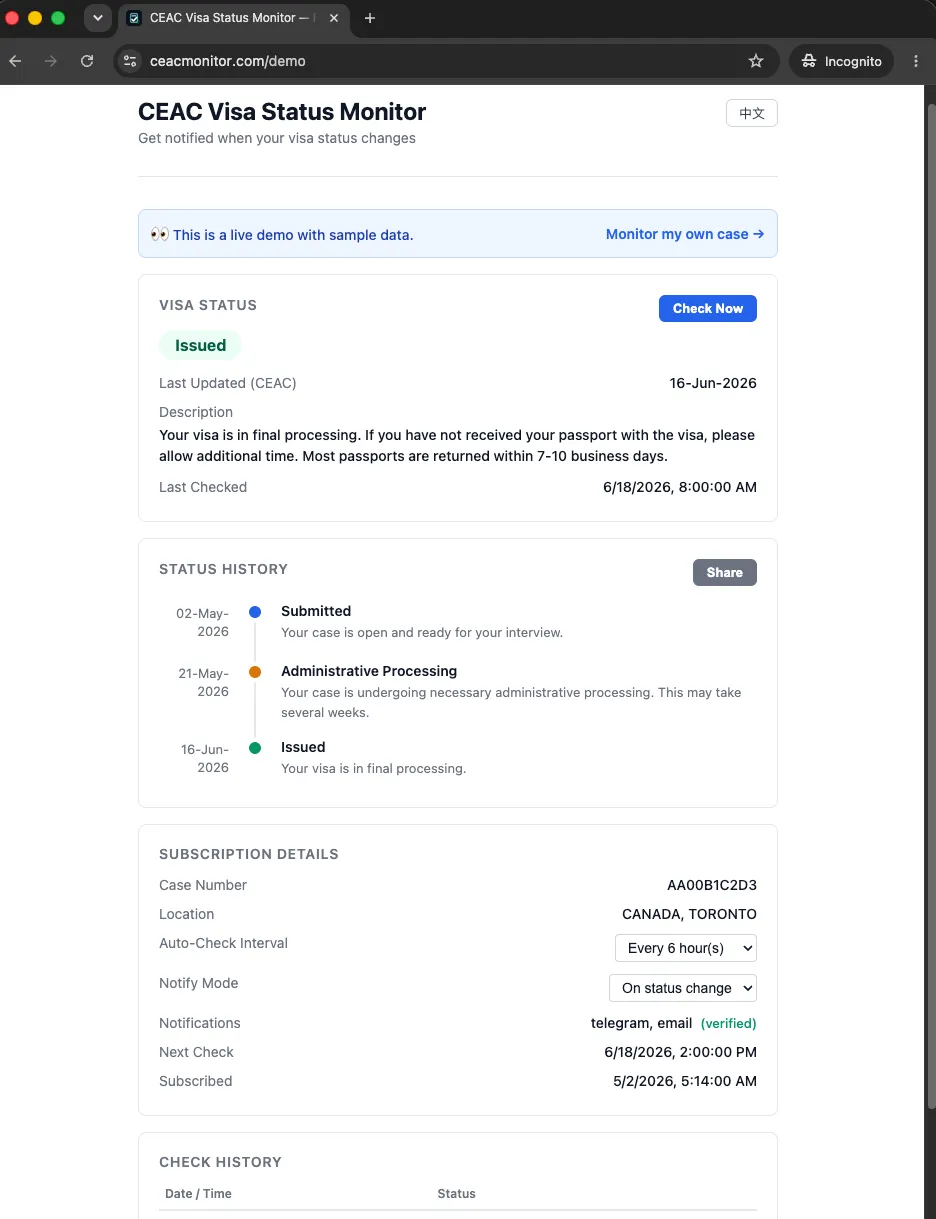
The dashboard at /status/<token> — the token is the URL and the credential at
once, no login. (Shown as the public /demo, rendered from sample data.)
The fan-out scheduler: one scrape, many subscribers
This is the part I’m happiest with. A naive design checks each subscription on its own schedule. But many people watch the same case — spouses, families, a lawyer and their client, friends in the same visa batch. Scraping CEAC once per subscriber would be wasteful and, worse, rude to the server I depend on.
So the scheduler — an EventBridge-cron Lambda — does a fan-out/fan-in: scan for
everything due, group by case_id to collapse N subscriptions into one work
item per case, scrape each unique case once, then fan back out to notify
every subscriber of that case on their own channels.
cases = defaultdict(list)
for sub in due_subs:
    cases[sub["case_id"]].append(sub)         # collapse to unique cases

for case_id, subscribers in sorted_cases[:MAX_CASES_PER_RUN]:
    current = check_status(subscribers[0])     # ONE scrape...
    save_status(status_table, case_id, current)
    for s in subscribers:                      # ...serves everyone
        if status_changed or s["notify_mode"] == "every_check":
            notify_status_change(...)
A couple of choices live in there: next_check_at is advanced per row only
after a successful check, so a failed scrape stays due and retries next tick —
no silently-skipped checks. And a MAX_CASES_PER_RUN cap plus a sleep between
cases keep the load on CEAC bounded even if the user base spikes. The dedup is a
small idea with outsized impact: it makes per-user cost sublinear in subscribers,
and it’s the biggest reason the tool is a good citizen toward the site it scrapes.
Notifications, and a product lesson
Two channels: email via SES, with a deep link back to your dashboard, and an
interactive Telegram bot that also handles slash commands (/check,
/status, /interval, /unsubscribe) so you can manage everything from the
chat.
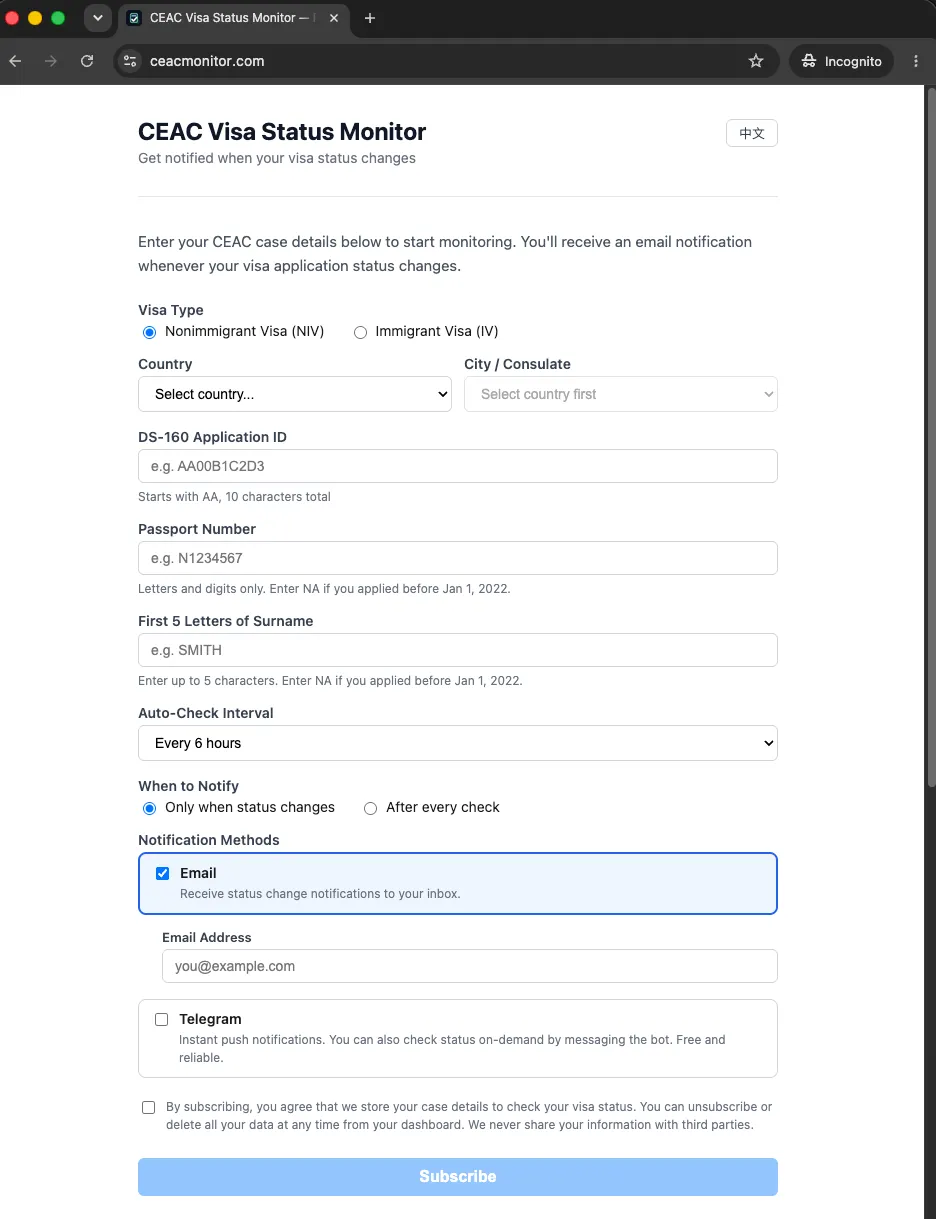
Sign-up is just case details plus a contact channel — no account to create, and Email is the default, with Telegram an opt-in below it.
The lesson worth recording is about defaults. I originally marked Telegram as “recommended” — it’s instant, free, reliable. But it has real onboarding friction (install the app, message the bot to get your chat ID), and many visa applicants don’t use it at all. So I flipped the default to email-first — universal, zero learning curve — and kept Telegram a supported opt-in. Lowering the friction of the default path mattered more than steering everyone to the technically-best one.
The infrastructure, briefly
All the scraping and notification logic lives in one shared checker module,
imported directly by the two Lambdas that need it: the cron scheduler and the
HTTP API (which also serves the Telegram webhook). One copy of the engine,
three triggers — the cron, the dashboard’s Check Now button, and a Telegram
command — so a scheduled batch check and a single live check run literally the
same code. Data is three DynamoDB tables, all on-demand (so idle cost is zero):
subscriptions, the
latest status per case (what the dedup reads and writes once), and a per-check
history that auto-expires via TTL. The frontend is a bilingual React SPA on S3
behind CloudFront, with the API served same-origin (CloudFront routes
/api/* to the HTTP origin, everything else to S3 — no CORS in the common path).
The whole stack is defined once in CDK and stamped out twice, prod and
staging, sharing zero state.
Cost is effectively $0/month at current scale: Lambda time is tiny, DynamoDB on-demand is negligible, SES is ~$0.10 per 1,000 emails — cheap enough that even users who opt into a ping on every check, not just on a status change, barely register — and the CAPTCHA runs entirely on the free on-device model. The fan-out dedup is what keeps it all there as users grow.
On scraping a government site responsibly
Worth being upfront: this queries the public, unauthenticated CEAC page on the user’s behalf, with the user’s own case details — the same request a person makes by hand, just on a timer. The design intentionally minimizes load: deduplicate by case, cap cases per run, throttle between requests, and allow intervals as long as 24h. It’s a thin convenience layer over a public page, not a bulk-extraction tool.
What building this taught me about coding with AI
For context: I didn’t write a line of this project. The scraper, the CAPTCHA pipeline, the React frontend, the CDK stacks, the ACM certificate, the CloudFront distribution, the deploys — all of it was built by Claude Code, end to end. The one thing I did by hand was register the domain. I mention it not as a confession but because the experience sharpened how I think about where software work is heading.
The thing that struck me most is how completely the bottleneck moves. Once a model can produce correct code on demand, typing stops being the constraint — deciding what to build, and judging whether what comes back is any good, becomes the whole job. Almost every decision that shaped this project was like that: serverless or always-on, a managed service or raw primitives, a capability token or a real auth system. Each of those has a default answer the model will hand you, and a right answer that depends on your particular constraints — and telling the two apart is where the value now sits.
One example stuck with me. Early on, Claude suggested hosting the frontend on AWS Amplify — the convenient, managed default. For my traffic that meant paying for something I didn’t need, so I redirected it to a plain static build on S3 + CloudFront with Lambda behind it. That single choice is most of why the thing runs at ~$0. The suggestion wasn’t wrong, exactly; it was just the generic default, and recognizing it as the wrong default for this case is the part that didn’t come from the model.
That’s the lesson I’d pass on, and the reason I’m skeptical of “AI means anyone can build this now” — at least for anything you’d want to run in production. I never typed a line, but I had to understand the platform well enough to know Amplify was overkill, that on-demand DynamoDB beats a provisioned table here, that leaning on a cheap-and-flaky CAPTCHA solver was safe because the task is self-verifying. Take that understanding away and building the same tool with an AI gets harder, not easier: you accept the first plausible answer at every fork, and the first plausible answer is usually the expensive, fragile one.
So if you’re trying to decide where to invest your own learning as these AI coding tools improve, I don’t think the answer is syntax, and it isn’t prompt tricks either — it’s the durable stuff: how systems fit together, what things actually cost, where the failure modes hide. The model writes the code now; what it can’t do is care about your constraints or notice when a reasonable-looking answer is quietly the wrong one. The code got cheap. Judgment didn’t — and I think that’s a good trade, because it leaves the most interesting part of the work to us.
Comments